
UML Deployment Diagram: Diagramming Guidelines
- Explore the issues involved with installing your system into production.
- Explore the dependencies that your system has with other systems that are currently in, or planned for, your production environment.
- Depict a major deployment configuration of a business application.
- Design the hardware and software configuration of an embedded system.
- Depict the hardware/network infrastructure of an organization.
There are guidelines for:
1. General
Figure 1. A solution-specific UML 2.x Deployment diagram.
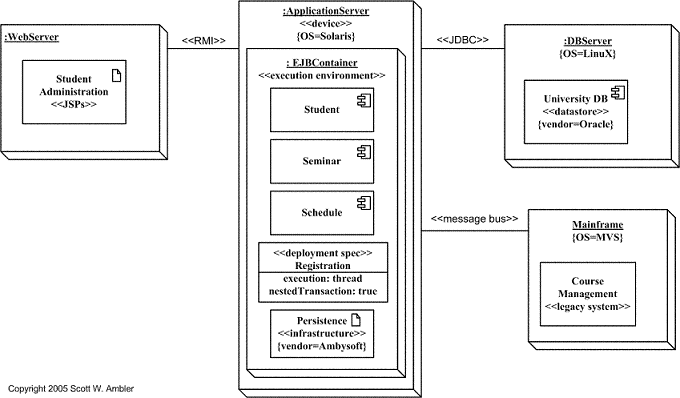
Figure 2.A network diagram for an organization.

- Indicate Software Components on Solution-Specific Diagrams. Figure 1 depicts a UML Deployment diagram for a university administration system.
- Focus on Nodes and Communication Associations on Enterprise-Level Diagrams. Figure 2 is an example a style of UML Deployment diagram often referred to as a network diagram or technical architecture diagram, depicting the technical infrastructure of a simple organization. Note that Figure 2is a very simple example, many organizations would have tens if not hundreds of nodes on such a diagram.
2. Nodes and Components
A node, depicted as a three-dimensional box, represents a computational unit, typically a single piece of hardware, such as a computer, network router, mainframe, sensor, or personal digital assistant (PDA). In UML 2 nodes can also be software. Components, represent software artifacts such as file, framework, or domain component.
- Name Nodes With Descriptive Terms
- Model Only Vital Software Components
- Apply Consistent Stereotypes to Components
- Apply Visual Stereotypes to Nodes
3. Dependencies and Communication Associations
Communication associations, often called connections, are depicted as lines connecting nodes. Dependencies between components are modeled as dashed arrows, the same notation used on other UML diagrams.
- Indicate Communication Protocols Via Stereotypes
- Model Only Critical Dependencies Between Components